# Error Handling (/runtime/http/error-handling)
Related: [Server](/runtime/http/server.md), [Routing](/runtime/http/routing.md), [Cookies](/runtime/http/cookies.md), [TLS](/runtime/http/tls.md), [Metrics](/runtime/http/metrics.md)
`Bun.serve()` runs in development mode by default. It is turned off when `NODE_ENV=production` is set or when you pass `development: false`.
```ts title="server.ts" icon="/icons/typescript.svg"
Bun.serve({
development: false, // [!code ++]
fetch(req) {
throw new Error("woops!");
},
});
```
In development mode, when a request handler throws and no `error` handler returns a response, Bun responds with a built-in error page that includes the error message, stack trace, source code around each frame, and file paths. This is meant for debugging locally.
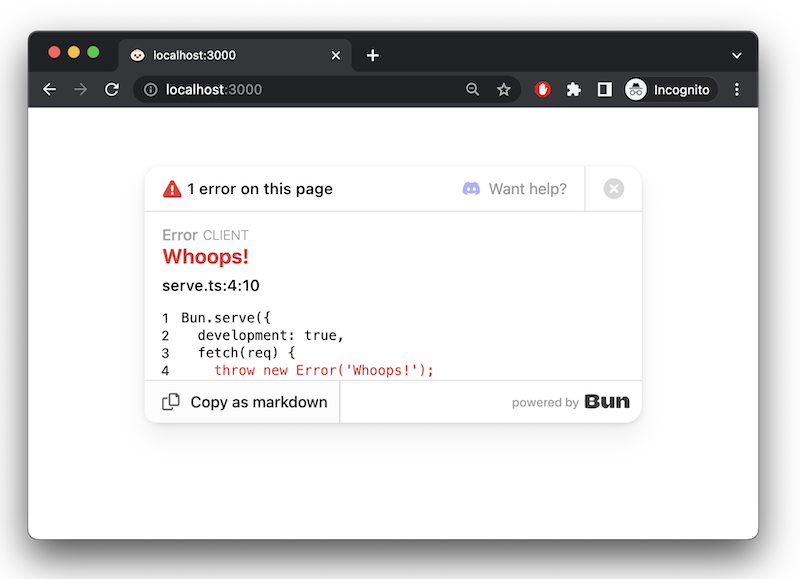
The development error page sends source code and file paths to whoever made the request. Set `NODE_ENV=production` (or
`development: false`) when deploying so uncaught errors return a plain `500` instead. The `--production` flag does not
turn it off: `bun build` and `bun install` have that flag, and `bun run` ignores it.
### `error` callback [#error-callback]
To handle server-side errors, implement an `error` handler. Return a `Response` to serve to the client when an error occurs. In `development` mode, this response replaces Bun's default error page.
```ts
Bun.serve({
fetch(req) {
throw new Error("woops!");
},
error(error) {
return new Response(`${error}\n${error.stack}`, {
headers: {
"Content-Type": "text/html",
},
});
},
});
```
[Learn more about debugging in Bun](/runtime/debugger)